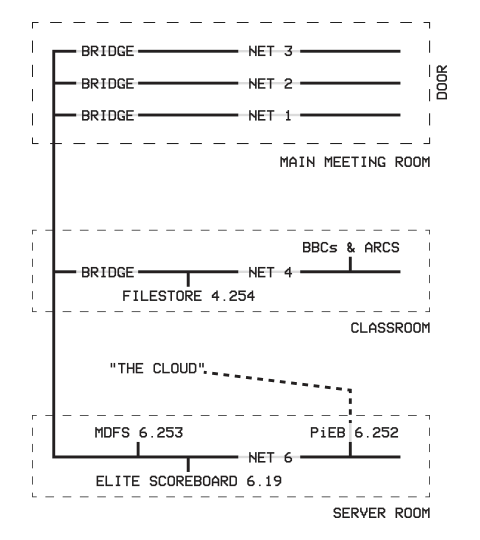
- Whilst setting up your Econet related gear, please pay attention to the following:
- Please keep the aisles free from obstructions
- You will have at least half a desk of space
- Stacking of machines is allowed
- Please be sensible
- Any special requirements? Just ask!
- Whilst talks are underway, please keep noise to a minimum but by all means continue Econetting if you wish.
Please do not connect your equipment to the Econet sockets provided until you have completed the following steps:
- Each row of desks has its own Net: 1, 2, or 3, shown on signs at the ends of the rows
- Find the
human DHCP servervolunteer responsible station numbers and request your preferred station number(s).
They will be wearing a museum lanyard and maybe even high-viz.
If you'd like a dedicated network ID either for a real Econet bridge or a virtual network on a PiEB, mention this at the same time. - Each Station on a specific Net must have a unique Station number. The
human DHCP servervolunteer responsible for station numbers will ensure there are no conflicts. - Station numbers are assigned on a first come, first served basis
- Use SETSTATION, DIP Switches or jumpers to change your machine(s) Station number(s) to those assigned to you, if applicable.
A standalone version of this tool is available here
Once you have done this and confirmed with a volunteer, you may connect to your equipment to the Econet socket provided and power it on to check for a clock.
Try issuing an *I AM 6.252 LANPARTY command to check for connectivity. You might also find some interesting things to explore!
Typical Network Map for the LAN Party